Welcome to SentryPC
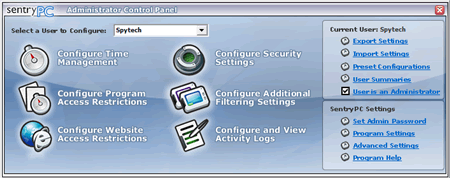
Congratulations on choosing SentryPC! SentryPC is a comprehensive monitoring, filtering, and access control software package that allows you to perform the following :
- Control how long users use your computer
- Control when they can use your computer
- Control when users can use specific programs
- Filter and block unwanted programs
- Filter and block unwanted chat clients
- Filter and block unwanted websites
- Filter and block typed keywords
- Monitor and record all user activities from what they type, to who they talk to, and what websites they go to
- Protect your users
SentryPC can be utilized by :
- Parents wanting to protect their children
- Parents wanting to control their children's computer usage
- Employers wanting to keep their employees on task
- Educational institutions restricting students activities to school work
- These are only a few potential uses!
Using our Help Documentation
Simply click a topic in the panel to the left to display all relevant information about that topic. All topics are explained in detail and are all accurate and up-to-date.
System Requirements :
- SentryPC supports Windows 200x, NT, XP, Vista, 7, or 8