Using Website Filtering
SentryPC offers flexible website filtering for each user on your computer. SentryPC can block websites based on their website address, or simple keywords contained in the website address.
How It Works
SentryPC will constantly watch what websites the user is visiting. If the user visits a website that matches or contains a website or keyword listed in the Website Filters list, then the website will be closed. SentryPC will then create an event log letting you know later that the user tried visiting a blocked website.
Configuring Keyword Filtering
First, to enable Website Filtering click on 'Enable Website Filtering' in the Website Filtering options page. Website Filtering's settings are configured as follows :
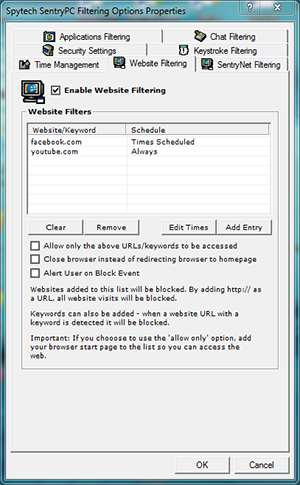
- Adding website / keywords
Click the 'Add Entry' button — a window will appear to add a Website Filter. Enter in a website address (partial or full), or a simple keyword.
Now select how you want the entry blocked. If you select 'always filter...' the entry will ALWAYS be blocked from execution. If you specify a time frame and check 'Filter Website during...' the entry will only be stopped during that time duration. When finished, click 'Add' to add the program filter to the list.
- Editing website / keywords
Click the 'Edit Times' button to edit the times during which a website/keyword is set to be blocked.
- Allow only the above URLs
This option allows you to reverse SentryPC's website filtering. Instead of SentryPC blocking websites that match the criteria in the filter list, SentryPC will ALLOW only websites that contain the filter criteria. For example, if 'food' is listed in the filter list, then only websites that contain 'food' in their addresses would be allowed to be visited.
- Alert on block event
If you want the user to be given an 'alert' notice stating they triggered a filtered event then check this checkbox.