Using Program Filtering
SentryPC offers fully customizable program filtering and scheduling for each user on your computer. SentryPC can totally block specific programs at all times, or block them during specific time schedules.
How It Works
SentryPC will constantly watch what programs the user is running. If the user runs a program that is scheduled to be blocked, or is set to be always blocked, SentryPC will disable it immediately. SentryPC will then create an event log letting you know later that the user tried running a blocked program.
Configuration
First, to enable Program Filtering click on 'Enable Applications Filtering' in the Applications Filtering options page. Program Filtering's settings are configured as follows :
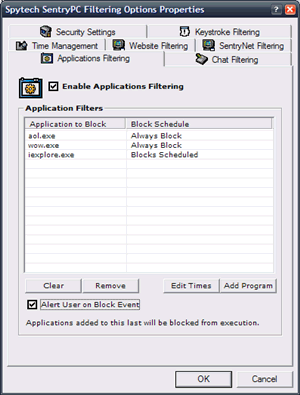
- Adding program blocks
Click the 'Add Program' button — a window will appear to add an Application Filter. First, click Browse and choose the executable you want blocked. Optionally, if you know the name of the program just type it in the box (i.e.: to block Internet Explorer just type iexplore.exe).
Now select how you want the program blocked. If you select 'always block...' the program will ALWAYS be blocked from execution. If you specify a time frame and check 'Block Application during...' the program will only be stopped during that time duration.
When finished, click 'Add' to add the program filter to the list.
- Editing program blocks
Click the 'Edit Times' button to edit the times that a program is set to be blocked during.
- Alert on block event
If you want the user to be given an 'alert' notice stating they triggered a filtered event then check this checkbox.