Program Settings
Accessible from the 'Program Settings' button in the Admin Control Panel these settings are explained as follows :
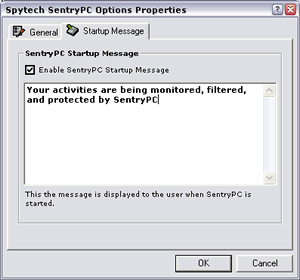
- Hide from taskbar
No icon will appear in the task bar for SentryPC
- Disable hotkey
The hotkey used to access the Admin Control Panel is disabled.
- Startup message
This message is customizable, and can be set to load whenever SentryPC is loaded.
Advanced Settings
Accessible from the 'Advanced Settings' button in the Admin Control Panel these settings are explained as follows :
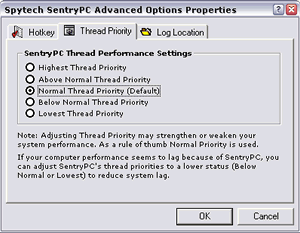
- Hotkey
This hotkey is used to access the Admin Control Panel without having to click on the 'Open Admin Panel' button on the main SentryPC interface. The default hotkey is CONTROL+ALT+SHIFT+M
- Thread priority
This setting controls how much CPU usage SentryPC can use — the lower the thread priority the easier SentryPC is on CPU usage.
- Log location
This is the location where SentryPC stores its activity logs. All users must have full read/write access to this location.