Using Chat Filtering
SentryPC can totally block specific chat clients from being ran by the user. The Chat Client Filtering runs independently of the Applications Filtering.
How it works
SentryPC will constantly watch what programs the user is running. If the user runs a chat client that is set to be blocked SentryPC will disable it immediately. SentryPC will then create an event log letting you know later that the user tried running a blocked chat client program.
Configuration
First, to enable Chat Filtering click on 'Enable Chat Filtering' in the Chat Filtering options page. Chat Filtering's settings are configured as follows :
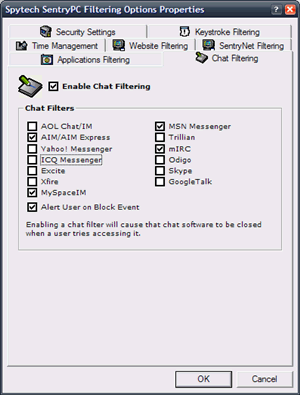
- Block chat clients
To block a chat client all you have to do is go down the list of chat clients and check the checkbox next to each client you want disabled. When these clients are ran by the user they will be terminated.
- Alert on block event
If you want the user to be given an 'alert' notice stating they triggered a filtered event then check this checkbox.